
4.1. General Information
Important
If you control the results of Boro VoD server management over API in the web interface, refresh the page after executing a command.
4.1.1. Description
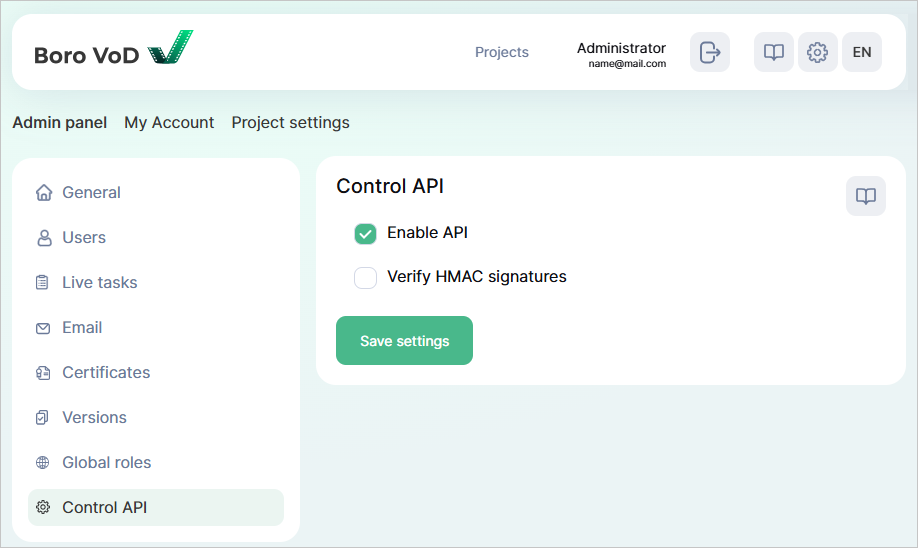
The API is meant for the Boro VoD Solution management and receiving quality control results. To configure API access, follow the steps below:
Log-in as the Boro VoD server administrator (the Superadmin role), open
 page;
page;Go to Admin panel ➝ General tab and ensure the
Host namefield is set. System cannot apply API settings without this;Go to Admin panel ➝ Control API tab, tick the corresponding checkbox and save settings;
Configure API access in the Nginx server, as access is denied by default.
[optionally] Configure user authentication.
4.1.2. Hierarchy of Boro VoD System Entities
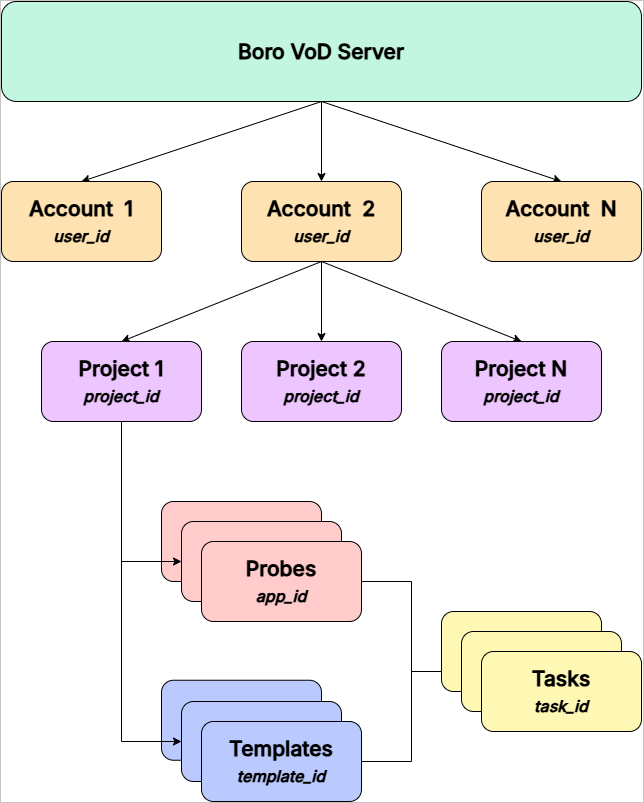
Boro VoD Server is a platform that lets you create accounts and projects to perform media file validation tasks;
Account is a registered user account in the Boro VoD system. It contains settings, a list of available projects, probes and templates. Each account is identified by a unique
user_idvalue, which is used in API requests;Project is a logical entity within an account that unites a group of probes, test templates, and to-be-performed tasks.
Each project is identified by a unique
project_idvalue, which is used in API requests,User can create an unlimited number of projects within a single account. In most cases, one project is enough. However, for ease of use, multiple projects can be created to differentiate various types of tasks or quality control locations,
Each project is unique and can be configured independently from other projects,
Users can grand other users access to their projects.
Probes are software components of the system that perform media file validation tasks against a test template. Each probe is linked to a specific project and operates according to its settings and templates. To scale the solution, user can launch an unlimited number of probes within a project. Each probe is identified by a unique
app_idvalue, which is used in API requests;Template is a JSON structure includes a list of tests. A test is a rule which the probe validates a media file in reliance to. Each test includes severity level, compliance conditions or thresholds and responsible for analyzing a specific parameter or error. Each template is identified by a unique
template_idvalue, which is used in API requests;Task is a process of analyzing a media file using a probe based on a predefined test template. Each task is identified by a unique
task_idvalue.
4.1.3. Message Format Description
The message format is based on JSON RPC.
Requests are sent to Boro VoD Server via HTTP POST on the URL http://<SERVER_NAME>/ctrl_api/v1/json.
REQUEST:
Request is a POST message with the content type Content-Type: application/json.
{
  "user_id":(number),
  "methods":[
    {
      "method":(string),
      "id":(number),
      "params":{
        ...
        /DATA/
        ...
      }
    }
  ]
}
where:
user_id - an integer value, a user identifier;
methods - an array of objects, a list of called methods with parameters. Several methods can be called in one request (including a call of several the same methods using the optional id field for a reply identification);
method - a string, a name of the called method;
id (optional field) - an integer value, a request identifier. A specified value is returned in a reply to a method call. The field is meant for a reply identification while calling several identical methods;
params - an object, parameters of a called method (see description of each method).
REPLY:
Data in the JSON format.
{
  "reply":[
    {
      "method":(string),
      "id":(number),
      "result":[
        ...
        /DATA/
        ...
      ]
    }
  ]
}
where:
method - a string, a name of the called method;
id (optional field) - an integer value, a request identifier. The value specified in a request is returned in a reply. The field is meant for a reply identification while calling several identical methods;
result - an array of objects, data returned by a method (see description of each method).